Sunday, August 27, 2006

LiveWriter test

This is my first post from "Microsoft LiveWriter" Beta. I am not sure what it is going to look like or how its gonna be. Lets just say I love surprises!

I like the idea of the LiveWriter. Previously, I used to type up my post using Notepad and keep it saved as a textfile till I get online and publish it. Yeah, sure I am on wireless internet and can connect even when I am on-the-move. But, there are times when you aren't able to or you dont want to. Anyhow, I can now type up and save the draft on my hard disk..till I want to publish it. Ofcourse, if my lethargy rules the day, some posts may still never make it online!!

So, is LiveWriter the answer to my prayers (if I prayed!) ? We'll see!!

Thursday, August 17, 2006

Wild Widget World

I saw a job post quite recently that read - "Wanted : Widget Developers..". The paycheck works out to be quite a handsome amount too. You cant deny that the club will get bigger!

There is a lot of stress being laid on "getting all the information want in one place". The battles have begun and the key players are the big wigs. Apple had the widget thingies for quite a longtime now. MS brings in the Sidebar in Vista. The Google toolbar also has gained a lot of fame. Adobe is planning to start a whole new revolution with Apollo. But..is it really worth having so much information in one place - on your desktop? I lean both sides for this one actually and am unable to take a pick.

The world is rapidly changing - new technologies coming in and things are getting a lot more competitive. There is so much happening and its getting tougher to keep tab on all of them..or..atleast..some of those that interest you. I aggregate about 7 RSS feeds on my Outlook 2K7 aggregator and still have like 350 unread posts. Remember, thats only the stuff I chose to aggregate!

Its not really "video killed the TV star" anymore! Its the PC that is bringing in quite a storm..uuh..ok..a correction..its not just the PC, its a whole world of gadgets and gizmos. A mobile phone is much more than just being a device to make/receive calls. The phrase has been coined "Mobility".. but.. do we really use all that stuff when we are mobile? A lot of us would shake our heads vertically. The way we pass time has changed. We prefer plugging into our iPods or walkman phones and churn up the mobile phone to send and receive information, whether it is just checking email or even blogging. GPRS has really kicked off bigtime and is going great guns!

OK, so thats one set of people who love to stay in touch with information and all that comes and goes with it. The other set of people still need the morning coffee and newspapers. They only think of a computer as a tool (and not life! ;-)). Well, these people are cool and collected!

The third set of people are funny! They are the big wigs in companies and are equipped with the latest stuff money can buy! They prefer to show off sayin' - I have a X brand laptop/PDA. The maximum they do with it is really just use basic Word or make calls. They dunno crap, but show off.

The reason I made the classification - the first set of people are really going to be the ones using and building the widgets. Like me, they have 350 unread posts...and.. have all the widgets/toolbars/sidebars etc that one can download off the net.. inspite of it.. 349 are still left ( minus the one that is displayed by default) or they dont really have the time to look at the widgets and the info it displays coz they are running around working for the 2nd and 3rd classes of people. The widgets load up at startup and remain there as is till the end of the day.. hogging the resources and not really serving much purpose.

Ofcourse, there is the "15 day ecstasy" factor. The first 15 days that you spend with the widget.. are the most exciting. You even start developing some yourself and maybe reply to a few of those job posts.

Friday, August 04, 2006

Happy B'day Flash! (Belated!)

I have been trying to publish this post for the past 3 days. Anyhow, time and I reached an agreement just now and we are live!

"Flash" is 10 years and 8 versions old now. Its time to reflect a bit on things and check out whats cookin'!

The first SWF I saw was back during the days of Flash 3. I am not sure if it was the Spooky and Bandit site that really did it! I was really taken by the interactivity and fluidity of graphics and sound. It was an amazing experience. Remember, these were still the days of HTML and poor bandwidth on dialups. For the amount of GFX, Sound and interactivity there was, it took quite a short time to load. Following natural instincts, I wanted to get onto the bandwagon. I went into a design based chatroom and asked - "How do I save a file as an SWF?". Got a quick reply - "File > Save". Ok, they were just pulling my leg, and that didnt spoil my eagerness. About 2-3 days later I got it. The Macromedia suite trial on a magazine CD- Dreamweaver, Fireworks, Director and Flash.

I still didnt know Flash made SWFs and kinda got confused with Shockwave. Yahoo-ed (Google was unknown to me back then!) for it and found Director to be doing the Shockwave thingy. Director was kewl at first, but, became a bit boring. And then, one day, it had to happen! I said - "Wonder what Flash is.." it said animation and interactivity in the product info!!! Installed it, used it and Loved it!

So that was how I got into Flash! I have been thru every version since then and now trying out stuff with Flash 9. Flash has truly become powerful - from just typing gotoAndStop to OOPS. The people at Macromedia (and now with Adobe) are all true visionaries! "FutureSplash Animator", kinda meant for Animation is now a big thing with developers too.

Big Steps:
- Flash MX (V6) brought in the components
- Flash MX 2004 Professional brought in OOPS, V2 components with data handling mechanisms, Mobile Development. Flash-based RIA grew!
- Flash 8 was a big step in rendering engines for text, graphics, together with blending and also gave a huge thrust to mobile development and Rich Internet applications.
- Flash 9 brings in AS 3. A huuuuuuuuge step forward and mighty powerful!

Macromedia also had other ways to exploit the technology and create products that used the Flash concept. They created Flash Remoting, Flash Communication Server, Central, Flex, Flashpaper, Breeze, Flash Lite and so on. All this goes to say how big the Flash technology really is!

Flash never really had a tough competitor! Corel brought in RAVE and Adobe brought in LiveMotion, when Macromedia announced SWF as opensource! Flash won at every turn. More people want their sites to made using Flash..Hell!! applications are being made with Flash! A lot of companies wanted to make their pot of money and brought in stuff to support Flash. EXE makers, decompilers, Editors..u name it!

Adobe acquired Macromedia and continue to spread the wings. Platform independence, Device support, application development, design and interactivity still remain buzzwords and as long as all these things makes sense, Flash will continue on its path. The future remains bright and big days are ahead!

Will Microsoft play their game and destroy Flash with "Sparkle"? The rumour mill says Sparkle might support the web in future versions. Whats more.. IE now blocks active content. Get it?I've said things before about Sparkle previously and supported it to a big extent. As long as Flash is out there, I will always love it!

Happy B'day Flash! And here is to the next 100 years! :)

Tuesday, August 01, 2006

The Battle of the Blogs

Keeping a diary and penning your thoughts in it was the in-thing not so long ago. A diary was considered a big possession and meant to be a secret thing. Reading other people's diaries was considered a bad thing and frowned upon. Girls were more possessive about it than guys. Well, that was back..centuries ago! The days have changed and we are living in tomorrow!

"Blogs" have now become the in-thing..and..if u have a blog and get quite a lot of hits, you are considered kewl. People love reading blogs and love to aggrate the RSS of fav blogs and keep uptodate on stuff. Companies seem to use blogs in quite a nice way too. Interesting bits of news are released on blogs and build up excitement. Its now become casual talk when u say - "you know about blah.. I read about it quite a long time ago on Mr. Blah's blog". It carries a lot of importance and has become a prestigious thing to read blogs of companies.

I am sure that the reading bit is very easy, but, the writing bit is kinda tough...especially for people like me..who dont want to share personal stuff online, but still keep an identity. Back when I started blogging, I used it like a diary and didnt really want to attract much attention..just a place to put ones thoughts. Well, then things changed and wars were fought. With this blog id, I try to mix and match between techy stuff and stuff like..well..this one. I do prefer to lean a bit more on the techy side of things..especially to do with technologies I love - Flash, Fireworks and "Sparkle". I plan to do so after August. For now, it will be what it is!

Sunday, July 30, 2006

THE TRUTH ABOUT SANCHEZ and all that Blah!

Meet Sanchez, the dude..ahem..beetle...actually just a li'l green bug with a big attitude! Sanchez was born somewhere between the north and south regions of the Amazon jungle. Unlike the coyote that doesnt speak, Sanchez is damn talkative...and talk.. he does! Sometimes, he says wise things. "He" insists that I cam "him" a "He" and not "It". And another thing - Sanchez doesnt believe in - "Speak only when spoken to". He speaks and makes sure you listen.


Ok, you must be thinking I watch too many cartoons and gone twidle-de-doo in my head. Umm.. I wont deny it. Cartoons are my life and need to see atleast 1 cartoon a day to keep my apetite at bay. Sanchez is a figment of my imagination, most truly, and I plan to carry a series on him on my website (when all is ready!). For now, I use Sanchez's name as an excuse while saying something nutty (but wise!). You can say that it is just a way to bring a smile (or even a burst of laughter) to people's faces. It feels nice and I am sure Chuck Jones must have felt that way too. Me feeling nice about something is certainly a selfish thing.. but.. I guess when people are happy, it brings a smile to your face too.


Lately, I think I've been having an overdose of cartoons. All is watch are cartoons it seems! Somehow, I dont have much of patience to watch a movie or anything else. Whether it is Spongebob squarepants or the Looney Toon Show, its all a part of the apetite. Mom thinks I've been making too much of kiddie software, but, I just think its that "inner child" that sees 'em. Just kidding! Actually, movies have become too stale. All we get these days is "old stuff" brought back to life with a "Returns" or "begins". That punch that movies had has gone poof! There seems to be no element in it that makes you really go see it. The hype that some movies get are too much. I wont say names, but most of the movies that have been hyped can be missed. Music has become more of a "sex sells" show. Raunchy steamy videos are the order of the day and it makes you go sick after sometime. There are a few good bands/artists around still, but their vids arent aired that much. TV series..umm..well..its all the same really.. nothing exciting! I watch Dr.House quite regularly, but, dont mind missing it. Oh my! Where has good TV gone?


All this said, cartoons kinda save my day. After a day's work, its relaxing and joyful to see the coyote still trying to get the road runner..or Sylvester trying to get Tweety. After all - Laughter is the best medicene and laugh you will!

Thursday, July 27, 2006

Li'l things that make your life kewl!

A pair of old faded Levis jeans, a matching Nike tee, Nike shoes and a pair of goggles - Matrix style..would certainly make you look kewl..but..thats not the "kewl" I am referring to.

I love my PC (at the office) and my laptop. There are these small utilities that make life a lot easier. Here are some of them:

1. MultiDesktop Manager - [Megascale Software] : http://www.muukka.net/multidesktop/
Like it says, it allows you to create multiple desktops and switch between them. So, you can have your work on 1 desktop and chat on others. You can create a new desktop, with a preferred Shell..or stick to Explorer.exe. You can also run applications from other user accounts, providing the needed credentials. Switch between the desktops using the CTRL+ALT+Left arrow key/Right arrow key combinations. Its a kewl little very useful thing that just costs 118KB!

2. Visual Task Tips - http://www.visualtasktips.com/ [FREE]
This is something that is built into Windows Vista..but..why wait till then..when you could have it on XP? The utility provides a thumbnail preview of the programs minimized in the taskbar. The best part is..the thumbnail preview is not static and keeps refreshing with the changes on the minimized app window. Now, thats kewl!

3. StationRipper - http://www.stationripper.com/
As the name suggests.. u can rip..or rather..record your fav internet radio station and save as MP3s. I havent made much use of this..but..I dig what I..umm..dug!

4. FlashGet - http://www.flashget.com
I am sure almost everyone must've heard about it and use it. FlashGet is a really user-friendly download manager and I cant imagine downloading stuff without it

5. Audio Converter - http://www.riverpast.com/en
I got introduced to this today. I needed to extract some audio from a MOV file for a quiz program and found the Audio Converter a good choice! Riverpast has more cool stuff too.

6. AVS TV Box - AVS Media - http://www.avsmedia.com/TVBox/index.aspx
I got a USB TV Box a few months ago had a few problems with the bundled software. AVS TV Box helped me out a great deal! You can watch TV and record your fav programs. You can also schedule recording. It supports a wide variety of devices, making it totally awesome. Try it! I wish it supported my Remote tho!

[more to come..]

Tuesday, July 04, 2006

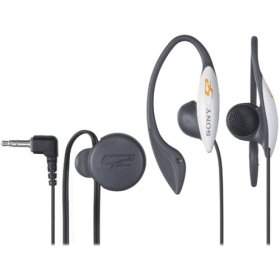
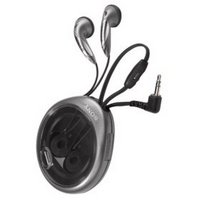
SONY - MDR-J11G vs Sony MDR-E829V

I am a Sony fanatic! I love music and I need quite a good amount of bass in it. "Tinnish" music is something I totally detest. So, it goes without saying that I am very choosy about my speakers and earphones. My Discman is my fav companion..yuh! u neednt even guess the brand!! Also, I prefer earphones to headphones for comfort.

I used to use the nice set of earphones..which..came with the CDman. But, the light had to shine someday and I had to walk into the Sony outlet in Chennai. The earphone stack caught my attention and I checked out a few. And then, I came across this one - the S2 MDR J11g.


There trial set sounded awesome and before I realized it, I had swiped my card for it! After that, came all the bragging and show off! The set really sounds good and cuts off all external noise. The earpiece sits very deep into you ear and the ear phone is held tight by the "C" shaped thingies. Bass freaks will love it and so did I. You could even hear the minute sounds of chimes and triangles very clearly. Sharp sounds get balanced quite well..so it doesnt hit you ear hard, giving you hours of pleasant hearing. Its a great piece to pick up if you dont want to listen to anyone or snything.

About a week ago, the wiring gave up! So, I only had one ear of sound. Rough-handling has its problems! The earphones cost about Rs.1350/-. I got a chance to find me a replacement when I went to Sony World during the weekend..and..I didnt find the S2. It left me heart-broken! However, I did want a earphone and I browsed thru the section for something that would give me the punch!

My eyes caught the Sony MDR-E829V. It didnt attract me as much as the S2. It looks very normal and didnt really impress me. I asked the dude who stood around for a good set of earphones, specially mentioning that I need bass. He pulled out the E829V and gave it to me saying "It has volume control and very good sound". Ok, it was way cheaper than the S2 at Rs.900/- that kinda made me think - what if it wasnt worth it? 900 bucks and no bass. Well, I bought it!


Boy! Oh boy! I just love these. The Sound is a lot more "balanced". It has very good bass and treble levels, which work at a scale (not uneven like the S2). Sharp sounds get evened out, so here again, it doesnt hit the ear. The punch you get when u hear Electric drums and drum effects is what I like about it! Moveover, it comes in a box, keeping the wires tangle free and secure. You can easily windup the wire into the box. The Volume control is 3 levels - Low, med and high. At high, the phones dont jar.

If you ask me which one is better of the two, I would certainly say the E829V. But, then again, it differs with every user. My boss hasn't heard music yet on this one. He loved my S2. The S2 made me feel the music and I guess it had a hand in changing my choosiness. I still love it and kinda feel bad about replacing it with another. But, hey..its a Sony! And it rocks!

Ok, so this is not a all tech speaking review. If you really need one of that kind..Google for it! :)


Wednesday, June 28, 2006

Will you "Flex" or "Sparkle"?

So, Flex 2.0 is out! I've always been a big fan of Macromedia..ahem..Adobe. Would Flex really change the RIA world? And..why is everyone really going GA-GA over it?

As tradition goes, new products carry a lot of new features and spruce-ups - Eclipse based environment, new classes to play with, the look and feel factor, AS 3 and quite a few others. Ok, let me say that again. I did mention AS 3.0! All of us have been hanging out in the Labs to get the sneak peak and tried our hands at making something really kewl with AS 3.0. I dont know many developers (around here) who wanted to try Flex for Flex! We all talked about the new classes of AS 3.0! We all imagined what "Blaze" would be like and what we can do with it. True! that people did talk about Flex itself, but, they werent in the majority, as far as my eye could see around me. By the time Beta 2 came out, there were a lot of converts. Lots of people waited around for Flex and made sure they got good at it.

Now that Flash Professional 9 Preview has released, I wonder how many people will be downloading Flex for what it is?

One beast is out and we await the other one! Eventhough the release is quite far away. Many of us, in the community, have started discussions about "Sparkle" and Flex and where the world is going..besides..who will win the World Cup.

The early CTP (think it was Jan or Feb CTP..not sure!) of Sparkle was fantastic. I had a few performance issues, but, that didnt hamper my experience with it. Microsoft's beast did feel a lot more powerful..well..yuh..it has to be! You have the .NET engine behind it. For people like me, who dont use the .NET *.NET*, but, just hang around it, its awesome! I didnt have much time to hang around with it and try all its features..so I cant be the perfect judge of things. Anyhow, the May CTP is out and I've installed it on Vista and gave it a whirl.


The performance seems to have improved. Its a lot faster on my laptop now. Previously, I had to wait for quite a while after hitting F5 (Test project). Here are my first views:
1. Flex weighs about 140MB (approx); Expressions Interactive Designer weighs a mere 7MB (approx). The weight difference maybe because Flex carries the whole thing. To work EID, you will need to install the WinFX, which weighs 43MB.

2. Both use XML based markups to layout the interface. Its MXML for Flex and XAML for EID. Both are very similar.

3. To give it a whole lot more power - Use Flex with ColdFusion or .NET. So that's additional installation. EID has the power of the .NET Framework behind it. You've already installed WinFX (or .NET 3 as they call it!).

4. Getting around doing things is a bit more complicated in EID. They could have made it as easy as using VS.NET, but, its a lot different and seems like a mixture between VS.NET and..umm..something else.. Flex is a whole lot easier with its Eclipse based IDE.

5. Flex works on the Web. Now, thats a biggie. MS says that Future versions could be supporting the web and mobile. We'll have to wait and see. If MS does get it on the web..well..thats HUUUGEEE!

6. Working with Data : I just tried XML on EID and Flex. Its quite similar. Will only know better when I really use it and get to compare. Right now..I am not commenting on it right now.

7. Adding interactivity : Maybe I find it a bit wierd the way things are done on EID, since, I've been always with Flash. For a EID beginner, its a bit tough finding your way around creating buttons. Once you get the hang of it, its a whole lot easier..as is the case always. What I really loved and appreciated was that you can also create a DISABLED state for the button. Doing simpler things need to be kept a lot simpler on EID.

Its just the 7 of them for now. I need to really get down to comparitive studies of both to write out a better review. This is not a review, so, I'm coming back to the point now.

Flex will be a major release for Adobe till EID finally shows face. Now, that Flex 2 is out, MS can take advantage by really paying close attention to details and look at shortfalls and provide for them in EID.

As a developer and tech enthusiast, I am not going to lay down the gauntlet and say this is better than that. I love .NET and anything that provides the power of .NET would certainly make it to the top of my list. But, then again, I love Flash and dont really use Flex..so its here nor there right now! Confusing eh? Ok, I'll say it with a straight face - "When EID is out, I'll be using EID most certainly and I'll never give up Flash (atleast, I dont think I will for the moment). ITS THE LOVE OF MY LIFE!"


Monday, June 26, 2006

100% Reusability?

As developers, we often speak about "Reusability". We all want to make our code and components "reusable", to make life easier. Do we really have to make things "reusable"? In reality, how "reusable" are things? Well.. I am not an expert developer, but, I guess I learnt a lot from what I see around me..and.. almost 60% of what I see doesnt really fit into the reusability bracket. Ok, its time I mentioned that I am a Flash Developer. In the Flash world, we used to replicate behaviour to make things reusable back during the earlier versions. "Smart Movieclips" became an interesting concept and most people used it to a good extent. The capabilities of Flash has grown significantly, and, with MX 2004 came ActionScript 2.0.

AS 2.0 changed a lot of things - the way we thought and the way we did things. It brought in "Classes" and all those things that came with it! In a broader bracket - OOPS (Object Oriented Programming). AS 2.0 is not perfect OOPS, but, it is Object-oriented nevertheless. Anyhow, many people I know started to over use Classes and pushed it in whereever possible. "Frame Scripting", they said, wasnt the way to go, since, things have to be reusable and AS 2.0. This has been argued quite a few times and it is still misunderstood. The way a lot of people in the community use OOPS is foggy! Well.. to me, code isnt and shouldnt be 100% reusable. You need to have a good degree of flexibility in it. As human beings, the way we think about something changes every now and then. As a developer, we look at a piece of code after a week and feel that it could have been done in another, simpler and more efficient way. This is where "Flexibility" kicks in! I've seen code..which is resuable only as long as it keeps doing the same kind of things in the same way. Its more of a fireline..u cant cross it to do something a bit different. Its also about how easy it is to make it work. This is a reason I used to like the V1 components (shipped with MX) a lot more. The components were easy to use and easy to customize. It was as easy as editing a movieclip. V2 components do provide a whole lot of kewl features, but, I guess that the simpler things and things people want to do..have been made difficult.

The way I code has changed quite a lot from the time I started on my AS feeding bottle. My coding really depends on the functionality. If I have a 100 buttons that do the same thing, I'd link them to a class and make merry. If I feel that the buttons need to be dynamic in some ways, I use Properties, which can be defined. I also use Frame AS quite a lot. Parts that are solely meant for that SWF go into the frame. I am building a library of classes I reuse, so, I have it all in one place and accessible anytime. They are not always reusable as is..but..modification needed is minimal. Well, this wouldnt be the way you might look at it..lets say, as a web developer or an RIA developer. In my line of work, it isnt quite often that you can reuse a whole class, for example. Specification and functionality can differ quite a lot. It sometimes is easier to create from scratch than customize code. Common behaviours, custom events and functions that are common to all projects are being reused. We also reuse code internally within the product. But, here again, this code falls behind the fireline. You maynot be able to use it for other projects that vary in features and functionality
quite a lot.


So, code needs to be Reusable and Flexible. It doesnt mean that you need to use AS 2.0 to make things REUSABLE! Smart Clips wasnt AS 2.0!! It was Frame Script all the way! I am not trying to go back in my ways. Just trying to say.. use 'em both in the right way!

Tuesday, June 20, 2006

Vistaaaaaaa

I know I've left the Office 2K7 review at about 5%. There's so much left to say about it. I am planning on making it into episodes and concentrating on each component (word, Excel, Outlook..). I guess that would be taking a bit of time, now that I've got my hands on "Vista Beta 2".

I havent still completed my own download of it. Its about 30% done. One of my friends got it and passed it on. Well.. so I went ahead and installed on my laptop (Acer 3002NLC - AMD Sempron, 512MB RAM, 40GBHDD). I didnt want to disturb the XP partition, so, I installed it onto a different partition.

I've installed about 3 previous builds of Vista on the same laptop..and..I was kinda heartbroken after the last build - it was really slow and crashed quite a lot. Ofcourse, it was much stabler than the ones before. Anyhow, the beta 2 seemed a lot better with its cleaner installers. It took me about 90mins to install it.

Once it was done, my heart almost stopped working. It wasnt taking my display driver (SiS760GX) as plug n'play..so I had no display. I had to just switch off the whole thing and head to bed! I dont have a monitor with me to plug it in and check..so I had to wait till morning!

The morning came..and I took the laptop to the office. Plugged it into the IBM monitor I have at my desk.. whaddaya know? Vista booted up nicely! It all looked quite good..but..my Laptop's monitor was still..Lifeless!

Determined to make it work, I tried installing the drivers in various ways..nothing seemed to work. Finally, I got the idea to run the Driver installer in WinXP compatibilty mode. The installer ran once again..and it kinda looked as if it was unsure about installing the stuff. But, then, it did..very luckily and that still runs after 3-4 reboots. I'm smiling again!

What I thought would be a sticky issue once again..with Vista booting slowly and crashing would all disappear soon! I found it to be very stable and much much much faster. Not many big changes interface wise. There are a few things I have noticed so far..and..here's a list of them:
1. Nutty Defender popup : The previous builds had a nutty popup every time you ran..anything almost! If you have the UAC turned OFF, pop goes the weasel! You wont be asked questions anymore!

2. UAC : This was something that played a major role in breaking my heart in the previous build. I wasnt even able to run my Net Dialer Client. So, my activation ran out! When I learnt of that there was an option in the User Account Management Console to turn it off..I was happy to turn it off. Well, its useful for sure, but, I am not on a network and I am the only person who uses my Laptop!

3. Cleaner install : Well, the installer is the first thing you notice! It has improved quite a lot in all sorts of ways. More detailed info is available on whats happening - Copying files, expanding files..etc.. Thats nice!

4. Bootscreen : It still doesnt have a Vista logo..just the little progress bar. Looks silly!

5. Bootup time : The previous build took so much time, that, I could make a cup of tea. Beta 2 is much faster booting up..BIG STEP in the right direction!

6. The experience : Performance improvements are something you'd really notice from the earlier builds. Its much faster and smoother. Finally, we get to see atleast some of those transistions! I dont really have a "Vista compatible" PC, so, I guess I am lucky enough to be able to see atleast some effects/transistions etc..

7. Installing Updates : I dont know if this is new..but..like the windows update window. Its neat and has quite a lot of details like Update History etc. Very handy for someone like me who doesnt update too often.
Once the updates were installed, the box to restart the machine came up and I found another kewl addition. You can now set the time for the reminder..so..it doesnt popup every few seconds saying that the machine needs to be restarted! The maximum time is 4hrs.

Well, this is what I've got so far! I'll update the review as I discover stuff - good or bad!


Wednesday, June 14, 2006

Its all Dynamic!

The "Layout" days are finally over! The V6 of my site has now got a face. My ideas with the V5, which is, currently online and still half-baked, didnt spark well enough. I had some troubles with the structure and flexibiltiy it allowed...plus.. the Data Management System, which, I had created for it, wasnt good enough.

I've scrapped the good old structure that I had been following for quite sometime now, and, made a totally new one. The new structure works on "feeds". All the information - text and images come to it as XML feeds and fits into the layout, which, basically speaking, is just a skeleton. ASP.NET will still be there in the background to make management easier. Yeah, this is normal stuff that people do and very close to what I have been doing so far with my sites. What really takes the cake is the CMS that I've already started working on..again..created using Flash and ASP.NET. It would allow me to update the feeds and set them as "active" and "inactive". "Inactive" feeds will be archived automatically. Its nothing special really! The coding part is very simple and all possible without much effort or too much thinking.

I've scrapped plans of putting up my Blog into the site. The simpler and more ideal thing to do, would be, to aggregate this blog as an RSS feed. I havent really decided on the sections yet. It would be more in terms of user preferences. So, Regular Menu is also being scrapped, for a more suitable option.

One thing is for sure..there will be an "Image Gallery"!

Its all been planned, mouse to the mouse pad.. I just need to get on with the coding. :)

Thursday, June 01, 2006

"fanaa"-ed!

So we went for a movie yesterday! It wasnt Da Vinci Code..which comes to theatres here today, by the way. The movie wasn't really Star Wars type. It was a typical Bollywood flick..keeping to all its usual masala - songs, dances, dress changing, comedy etc.. On my scale, it would make 2/10 and I would suggest you go see it..only if..only if..u are totally bored and are very desperate to see a movie and live a theatre experience.

If you are wondering what "Fanaa" means, it means "destroyed in love". Its an Aamir Khan, Kajol starrer. Kajol's a blind Kashmiri girl and Aamir is a "terrorist on a mission". I am not going to play story teller here..maybe that would make u go see the movie!

First up, the thing I noticed - usually the heroine's friends look good...they still have silly names - Fatty (for Fathima) and Bobo! Strangely, they dont appear after the first part of the movie. The music is good and luckily the speakers in the theatre didnt sound flat and "trebled"! I liked the "Moula" track. Its seems to become a trend to have guitar riffs in songs these days..which is kewl! I also liked the patriotic dance track - not just the music, but also the picturization. The locations and shots are kewl too.

Well, if you are a "shayari" fan, it has some nice ones - some easy to understand and some others that will make you go buy that book you always wanted - "Understanding Shayarii for Dummies". There were some nice ones that I thought - I must remember this to quote in my impress my girlfriend ;-) But..I dont remember any! Would that go and make me see the movie? Well..uhh..NOPE!

Funny ones:
Movies have their funny moments.. not comedy scenes..like..for instance...
1. Once Kajol learns that Aamir is the wanted terrorist, she SOSes the military people via radio. They tell her - "we'll arrive tomorrow morning"..uhhh?
2. Ok, so the dude has killed a person and has come home. You know that he is a terrorist..what do u do, jack? what do u do? Umm..lets see..I drive to radio the military officials with my kid and wait there! Surely, my hubby is going to show up there..and..by the way..my hubby is the terrorist!
3. Heros always run their distance!
4. Right after an eye operation, doctors ask you to identify dead bodies?
5. Ahh yes and the best one - Terrorists use cellphones and radios to update information..like "I am having the trigger (aka detonator for the nuke!) and I will meet u at Blah place". They also call each other using real names..not code words.

Ok, I am not going to say these things anymore..I am hoping that'll get u to watch the flick! :)

Office "12" : At first glance

After freeing up quite a bit of space on my Windows partition, I was able to finally install Office 2007 aka "Office 12". It takes a whopping 1.3gig of space to install Word, Excel, Powerpoint, Access, Infopath, Outlook and all the other stuff that come with it.

It was love at first sight. The interface looks a lot kewler..no more drab formy looks! The interface is quite different from the previous versions, but, its very easy to get used to it. Basically, the old Menu style has been replaced with a more "tabbed layout".

Here are a few things I noticed at first glance:
1. Missing "File" menu : The first thing I noticed was the missing "File" menu, in its place was.. "Home". I also noticed the round button with the office logo on it, sitting at the top left corner of the screen...clicked it..and I smiled..I found the "File" menu! Strangely, Outlook still has the File menu in the main screen! When you compose a New message..it doesnt!

2. The "ALT" key effect : When you press and hold the ALT key on Windows apps, the Underline under the letters you need to press with ALT gets visible. Pressing the ALT key in Office 2K7 makes these tiny boxes containing the combination letters visible. It stays till u press ALT again.

3. Live Preview : So, now u can see what a font looks like before really using it.

4. Document File size : I didnt believe it when I read about it, so, I tried out a "hello world experiment". Typed "hello World" on an empty page in word and saved it using both 2K3 and 2K7 versions. 2K3 doc filesize - 19.5KB and 2K7 docx file size - 9.47KB.

5. Zoom : You also have a zoom slider at the right hand side bottom of the screen.

6. Help : The "Help" menu also has been popped out of the menubar. Its now a small blue round button located just below the "x" (close) button.

One funny thing I found.. the interfaces for Word, Excel, Powerpoint and Access are laid out in a similar way, but, Outlook is a "mixed bag" - it has a mix of both the old style (as in previous versions) and the new kewl blue style!

These are just somethings I found at my first glance. I will be adding more parts to the review, when I really play around with it.

Wednesday, May 31, 2006

Welome to The Grid

What if the whole world was one? What if we could do what we do in one place..anywhere else? What if sharing was limitless? what if... Welcome to The Grid!

The Internet has been around for ages now and it has changed significantly to make information sharing so easy and simple. Pushing the boundaries a lot further, we are coming to an age that is all about "being mobile" with everything located centrally, so that, what you require is always available, it doesnt matter what kind of device you will be using to access the information. The reality is not so distant. With major players like Microsoft and Google working on it, you can guarantee that life is going to change.

Microsoft LiveDrive - With their immense resources, financial backing and server farms..well..the giants will be offering huge amounts of online storage that you could use to store any kind of data.

Google Lighthouse Project - Folks at Google are always upto something and if Lighthouse is to become a reality..well..bye bye PCs with 80gig HDDs. They say that the storage will be infinite. Imagine the amount of data you could put in there!

I'm sure more will jump into the bandwagon as time goes on. There are so many other things that are coming up like the whole set of "Live ideas" from MS and all sorts of things from Google, that, aims at making you and your world totally mobile.

We were having a discussion about such things in the morning today..and..one of my friends remarked - Who knows when all this will really kick some serious dust? Net connectivity is not fast enough. There are two or three things here that I could mention:
1. Back during the 80s and 90s, we were browsing at 36KBPS. Now, we have atleast 56KBPS on dialups and much more on broadband. Its going to become faster and cheaper

2. When one thing changes, complimenting technologies always change. Once again, back during the 80s and 90s, when HTML pages ruled the roost, we didnt really need great speeds..and..once the characteristic of content changed. Speeds increased!

3. The Speed bracket is always on the increase, so it should certainly become much faster.

Well, all this seems to be a very rosy picture right now. There is a lot to be scared of:
1. Information becoming impersonal - If all your private info is located somewhere, someone else can always make use of it. It happens now. You give your email ID to Company X, you get emails from so many! The Privacy Policies need to be reframed by the company and we, as users, need to really make sure that we read and understand what we are getting into
2. Security - The type of attacks are going to evolve to become much more scary! Security always needs to be beefed up. One flaw in the whole thing may destroy data belonging to so many people.
3. File sharing - If its going to be like being on our own LAN, where, users can give rights to other users to access files? well, laws on file sharing will go to hell!

The companies who are already in it, most certainly, have a lot to think about and implement. They should be ready for it..and we should be ready to change!

Tuesday, May 30, 2006

Bloggin' is kewl again!

Ok, so I am back! Its almost a year since I said my "astalavista baby!" to blogging.